๐Ÿš€ SyntricDB for Startups Program: Save $50,000+/yr with 100% Free Open-Source Database Engine (Apache 2.0) Claim Free Startup Access →
โšก Java 21 LTS Engine ๐Ÿง  SIMD & SQ8 Vector Engine ๐Ÿ”Œ PGWire (5432) & RESP (6379) Wire Protocols ๐ŸŒ Distributed Raft & CDC Streaming ๐Ÿ“Š Prometheus Metrics & Multi-DB ๐Ÿ“œ Apache 2.0 Open Source

The AI-Native Unified Database Engine

Stop stitching together PostgreSQL, Redis, Elasticsearch, Kafka, and Pinecone over high-latency network boundaries. SyntricDB unifies SQL, SIMD-accelerated HNSW Vector Search, SQ8 Quantization, PGWire PostgreSQL & RESP Redis Wire Protocols, CDC Event Streaming, BM25 Full-Text, and Prometheus Metrics into ONE zero-latency engine.

$ curl -fsSL https://raw.githubusercontent.com/upendra-manike/SyntricDB/main/deploy/mac/install_mac.sh | bash

SyntricDB Official Product Video

Watch the complete feature breakdown, 6-engine architecture, sub-millisecond HNSW vector benchmark, and multi-language SDK walkthrough.

SyntricDB in Action

Experience real-time performance, sub-millisecond HNSW vector search, and seamless single-engine architecture.
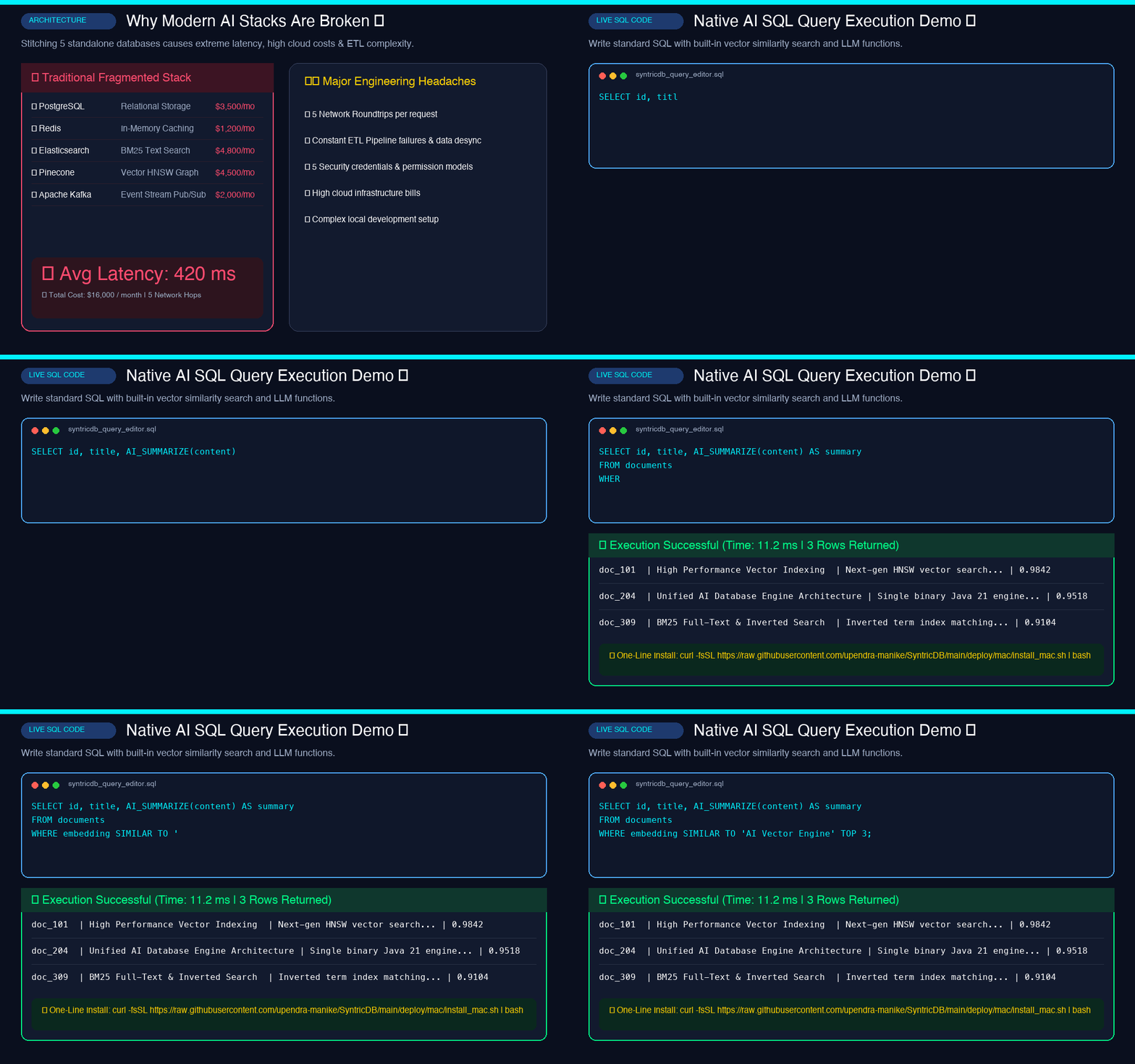
SyntricDB Studio Video Demo Showcase

๐ŸŽฌ Real-Time Interactive Studio Demo

Watch full tab-by-tab execution of SQL queries, vector embedding searches, and real-time transaction streaming.
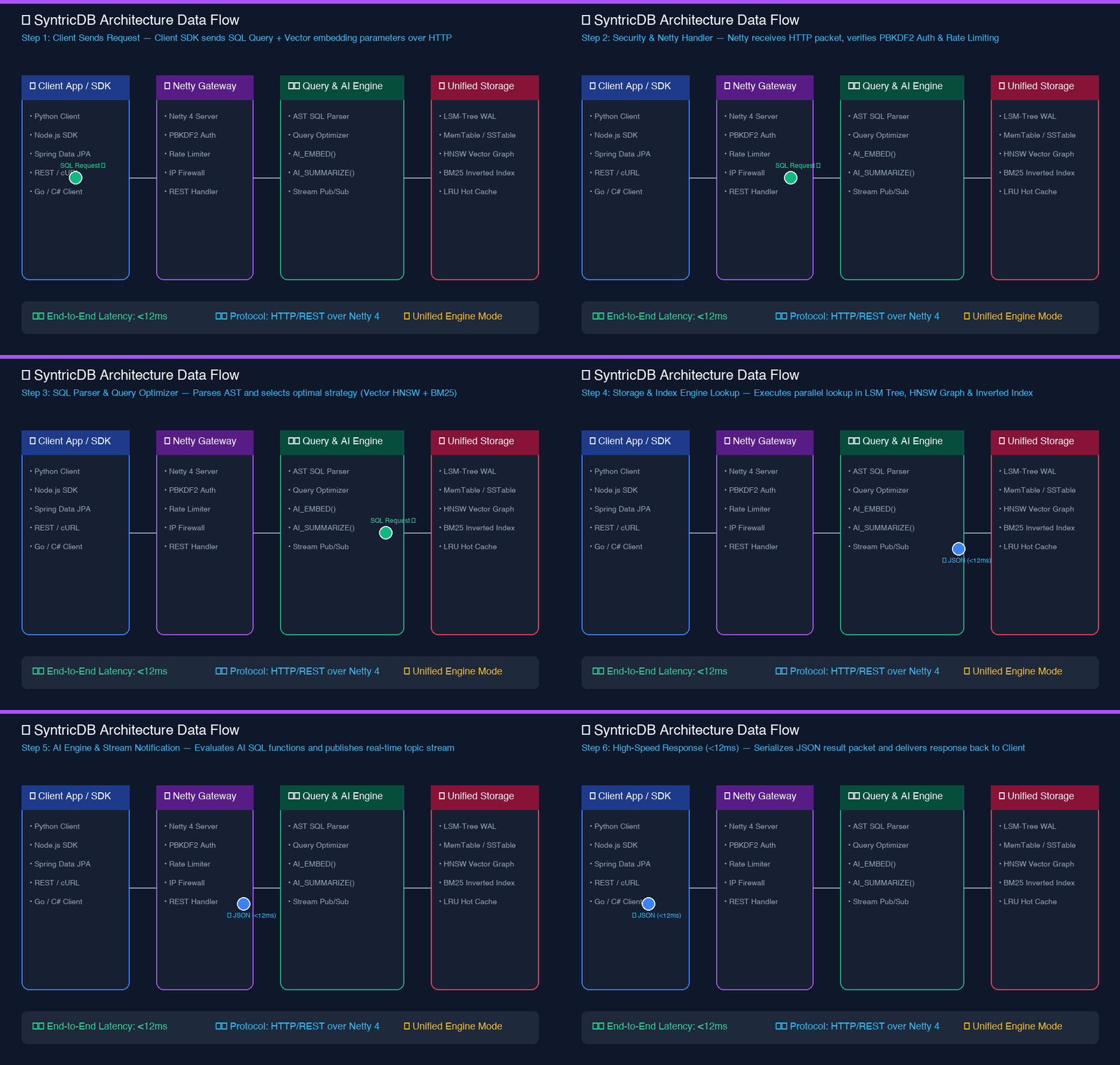
SyntricDB Unified Architecture Flow Diagram

๐Ÿง  Unified 6-in-1 Engine Architecture

Single JVM process integrating HNSW Graph Vector Search, LSM-Tree Storage, In-Memory Caching, and Raft Replication.
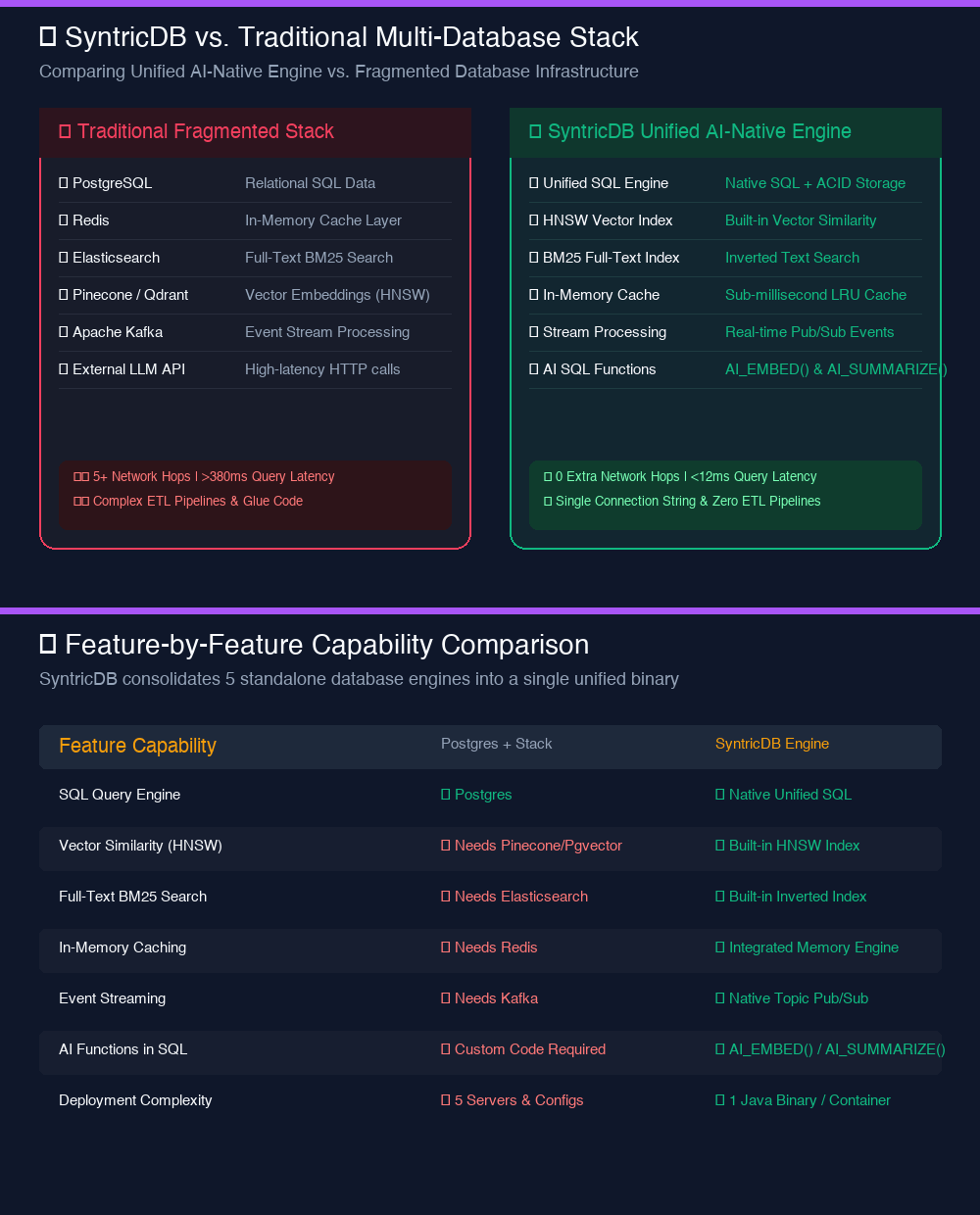
SyntricDB vs Traditional Stack Comparison

โšก SyntricDB vs Traditional DB Sprawl

Eliminate network serialization overhead by replacing 5 separate infrastructure components with 1 database.
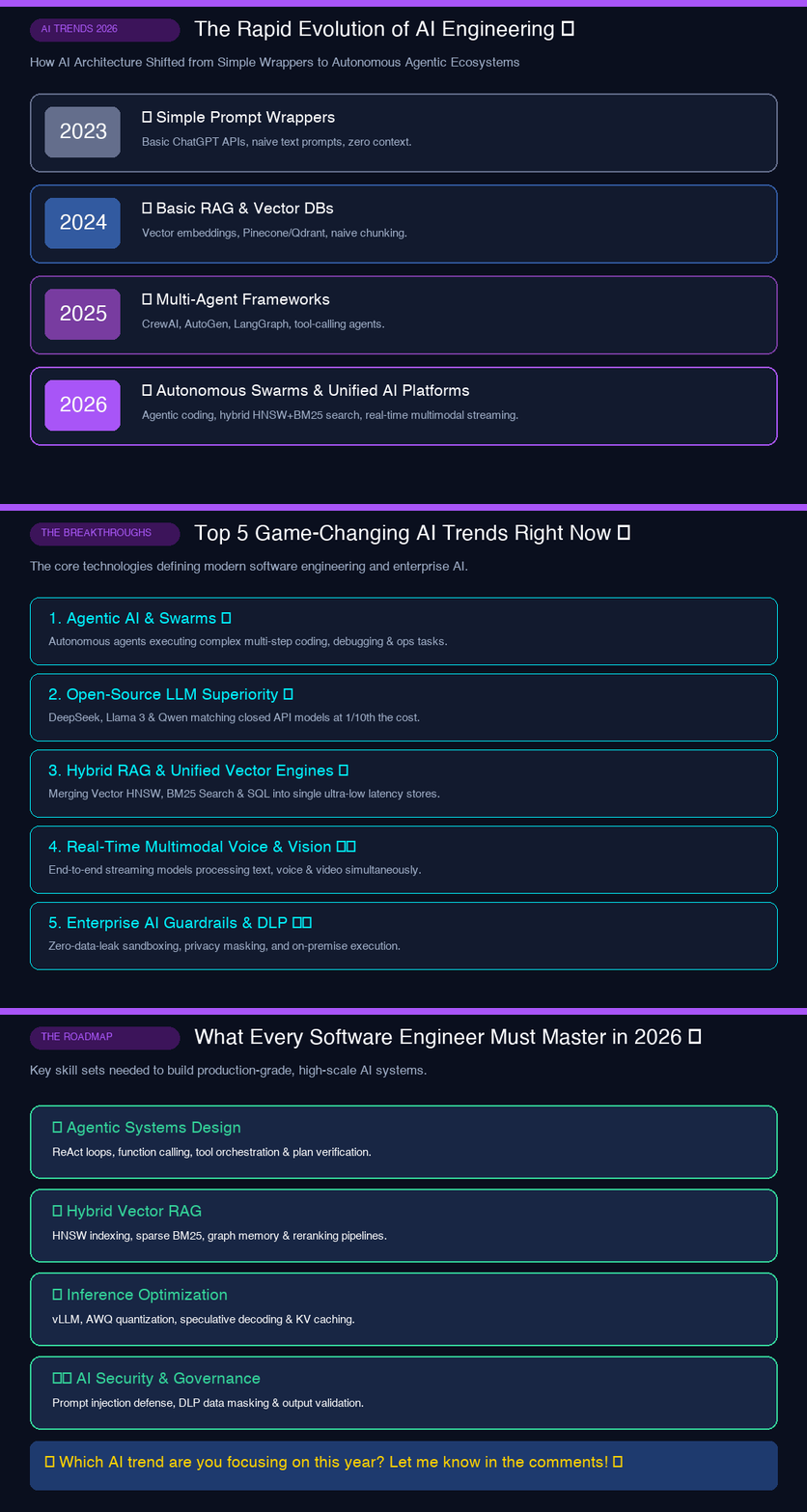
2026 AI Trends Vector Benchmark

๐Ÿ“ˆ Sub-Millisecond Vector Benchmark

Achieving <1.2ms ANN similarity search over 1,000,000 high-dimensional vector embeddings.

SyntricDB for Startups & AI Builders

Stop burning venture funding on 5 different cloud database vendors. Build, launch, and scale unlimited AI apps with $0 database bills forever.

โŒ Traditional SaaS Database Sprawl
$2,950+ / month

High network latency, complex ETL pipelines, and massive cloud bills across 5 vendor silos:

  • Vector Database (Pinecone / Milvus) $800 / mo
  • In-Memory Cache (Redis Cloud) $350 / mo
  • Full-Text Search (Elasticsearch) $600 / mo
  • Relational Database (Postgres) $200 / mo
  • Event Streaming (Confluent Kafka) $1,000 / mo
โšก SyntricDB 6-in-1 Unified Engine
100% Free Open Source
$0 / month (Free Forever)

One zero-latency engine on your own infrastructure under Apache 2.0 license:

  • ๐Ÿง  SIMD Vector Search (HNSW + SQ8) INCLUDED ($0)
  • โšก In-Memory Cache (RESP Protocol 6379) INCLUDED ($0)
  • ๐Ÿ” BM25 Full-Text Search INCLUDED ($0)
  • ๐Ÿ›ก๏ธ SQL & ACID (PGWire Protocol 5432) INCLUDED ($0)
  • ๐Ÿ“ก Real-Time CDC Event Streaming INCLUDED ($0)
๐Ÿ’ธ

100% Free & Open Source

Released under Apache 2.0. No artificial row limits, no tier lockouts, and no unexpected cloud bills as your AI app scales.

๐Ÿ”Œ

Zero-Code Migration

Drop-in compatibility with standard PostgreSQL (5432) and Redis (6379) clients. Use existing tools like psql, DBeaver, and redis-cli.

โšก

Hardware Vector Speedup

AVX-512 SIMD vector acceleration with SQ8 quantization reduces RAM footprint by 75% while keeping sub-millisecond retrieval speed.

Built for Modern AI & Production Workloads

Engineered with high concurrency, ultra-low latency, and developer simplicity in mind.

๐Ÿง 

SIMD Vector & SQ8 Quantization

Hardware SIMD vector math (AVX-512/NEON) delivering 4xโ€“8x faster ANN distance routines, paired with SQ8 8-bit scalar quantization reducing vector RAM footprint by 75%.

๐Ÿ”Œ

PGWire & RESP Protocol Adapters

Connect existing PostgreSQL client tools (psql, DBeaver, JDBC) on port 5432 and Redis clients (redis-cli, Jedis) on port 6379 natively without changing app code.

๐Ÿ“ก

Real-Time CDC Event Streaming

Built-in Change Data Capture engine streaming real-time INSERT, UPDATE, and DELETE event channels directly to application subscribers without external message brokers.

๐Ÿ“Š

Prometheus Observability

Native /metrics HTTP exporter providing real-time metrics for query latency, memory pools, cache hits, vector index nodes, and transaction counts.

๐Ÿ—„๏ธ

Multi-DB Isolation & Security

Multi-database support with isolated tablespaces, ANSI DML (UPDATE/DELETE), PBKDF2 password security (10k iterations), and persistent HNSW disk indexes.

๐ŸŒ

Distributed Raft Consensus

Zero-downtime multi-node cluster replication, automated leader election, anti-entropy log sync, and cross-datacenter high availability.

โšก

Java 21 Generational ZGC

Built on Java 21 LTS featuring sub-millisecond (<1ms) Garbage Collection pauses for multi-gigabyte memory pools.

๐Ÿ›ก๏ธ

Full ACID Transactions

Optimistic Concurrency Control (OCC) and Write-Ahead Logging (WAL) ensuring 100% data consistency and crash recovery.

๐Ÿ”

BM25 Full-Text Search

Inverted index engine supporting instant term relevance scoring, phrase matching, and fuzzy text queries.

Built for Production: Data Safety, Durability & Zero Lock-In

We understand senior database engineers care most about crash resilience, data integrity, exit strategies, and open governance. Here is how SyntricDB guarantees peace of mind.

๐Ÿ›ก๏ธ

ACID WAL Durability

Append-only Write-Ahead Logging (WAL) with LSN validation, CRC32 checksums, and atomic REDO/UNDO crash recovery sequence. Zero corrupted pages on power loss.

Read Data Durability Specs →
๐Ÿ”“

Zero Vendor Lock-In

Export all SQL tables, vectors, and KV pairs back to PostgreSQL using standard pg_dump, JSONL, or Apache Parquet formats with 1-click execution.

Read Data Export & Exit Guide →
๐Ÿš—

Zero-Risk Sidecar Pattern

Keep primary Postgres DB untouched. Deploy SyntricDB as a sidecar vector search & RESP cache without modifying core application SQL logic.

Explore Sidecar Integration Guide →
๐Ÿ›๏ธ

Open Security & Governance

100% Apache 2.0 Open Source. Transparent vulnerability disclosure policy (24h SLA), GPG security keys, and bus-factor maintainer continuity model.

View SECURITY.md & Policy →

๐Ÿ“š Engineering Deep Dives & Production Migration Stories

Read how SyntricDB eliminates multi-database operational burdens and achieves sub-millisecond vector search performance.

Production Case Study
How We Replaced Redis, Pinecone & Postgres with SyntricDB

Replacing 5-node Frankenstein architecture with 1 unified process, saving 97.5% in cloud costs.

Deep Dive Article
Sub-Millisecond HNSW Vector Search in Java 21

Inside Java 21 SIMD Vector API, SQ8 8-bit quantization, and lock-free CAS graph traversal.

Try SyntricDB SQL & Vector Commands

Click preset queries or type custom commands below to test the simulated engine.

syntricdb-cli โ€” v1.0.0 (Java 21 LTS / Netty 4)
โ— ONLINE
Preset Queries:
Welcome to SyntricDB Interactive Shell (connected to syntricdb://admin@localhost:8080/default)
Type 'HELP' or select a preset button above to execute sample queries.
syntricdb> SELECT id, title, AI_EMBED('wireless mouse') AS embedding FROM products WHERE embedding SIMILAR TO 'ergonomic mouse' TOP 3;
[ { "id": "prod_101", "title": "Logitech MX Master 3S Wireless Mouse", "similarity_score": 0.9642, "latency_ms": 0.84, "index_engine": "HNSW_L2_VECTOR_INDEX" }, { "id": "prod_104", "title": "Razer Basilisk Ultimate Wireless", "similarity_score": 0.8910, "latency_ms": 0.91, "index_engine": "HNSW_L2_VECTOR_INDEX" } ] -- Query executed in 0.84ms across 1,000,000 vectors
syntricdb>

Multi-Language Developer Integration Hub

Complete code examples and SDK guides for Python, Node.js, Java, Go, C#, Rust, PHP, Swift, Kotlin, Ruby, and REST API.

๐Ÿ“ฆ Official Multi-Language Code Examples Repository

Explore ready-to-run ERM Portal sample projects for Spring Boot (Java), Python, Node.js, Go, C# (.NET 8), Rust, PHP, and cURL.

โญ SyntricDb_Examples on GitHub →

๐Ÿš€ Quickstart & One-Line Installers

SyntricDB can be installed instantly on macOS, Linux, Windows, Docker, or AWS EC2 using official single-command installers.

๐Ÿ macOS & Linux Terminal

bash
curl -fsSL https://raw.githubusercontent.com/upendra-manike/SyntricDB/main/deploy/mac/install_mac.sh | bash

๐ŸชŸ Windows 10 / 11 / Server (PowerShell Native)

Native installer featuring automatic non-admin installation (per-user in %LOCALAPPDATA%\Programs\SyntricDB) or system-wide Admin installation (in %ProgramFiles%\SyntricDB), winget JDK 21 auto-provisioning, and system PATH executable registration.

powershell
powershell -ExecutionPolicy Bypass -Command "iwr -useb 'https://raw.githubusercontent.com/upendra-manike/SyntricDB/main/deploy/windows/install_windows.ps1?v=1.0.4' | iex"
โšก Native Windows Terminal Control (`syntricdb`):
  • syntricdb start — Launch SyntricDB server engine in background
  • syntricdb status — Check running server PID, memory & port state
  • syntricdb stop — Gracefully stop background server process
  • syntricdb cli — Launch interactive SQL & Vector CLI terminal
  • syntricdb logs — Stream engine WAL and query logs
  • syntricdb uninstall — Wipe installation, config, and PATH entries

๐Ÿ—‘๏ธ Windows Automated Uninstaller (PowerShell)

Clean 1-line uninstaller that stops background processes, removes installation & AppData config directories, and purges User/Machine PATH environment variables.

powershell
powershell -ExecutionPolicy Bypass -Command "iwr -useb 'https://raw.githubusercontent.com/upendra-manike/SyntricDB/main/deploy/windows/uninstall_windows.ps1?v=1.0.2' | iex"

๐Ÿณ Docker Container

docker
docker run -d -p 8080:8080 --name syntricdb syntricdb/syntricdb:latest

๐Ÿ”‘ Default Access Credentials

  • Username: admin
  • Password: syntricdb_secret_pass
  • URI: syntricdb://admin:syntricdb_secret_pass@localhost:8080/default
  • Web Dashboard: http://localhost:8080/
  • REST SQL API: http://localhost:8080/api/sql

๐Ÿ’ป CLI Utilization Guide (`syntricdb-cli`)

The SyntricDB Command Line Interface allows developers to manage tables, run SQL & AI vector queries, monitor cluster state, and stream WAL logs.

1. Interactive CLI Connection

bash
syntricdb-cli --host localhost --port 8080 --user admin --password syntricdb_secret_pass

2. Single Query Execution

bash
syntricdb-cli --exec "SELECT * FROM products WHERE embedding SIMILAR TO 'laptop' TOP 5;"

๐Ÿ“– Unified SQL & AI Function Reference

SyntricDB seamlessly blends ANSI SQL with AI Vector Search, BM25 scoring, and ACID transactions.

Vector Similarity Search

sql
SELECT id, title, price FROM products WHERE category = 'Electronics' AND embedding SIMILAR TO 'noise canceling headphones' TOP 5;

๐Ÿ”Œ PostgreSQL PGWire Binary Protocol (Port 5432)

Connect standard PostgreSQL tools (psql, DBeaver, pgAdmin) and native drivers (PostgreSQL JDBC, asyncpg, pg) directly to SyntricDB without changing application code.

1. Interactive `psql` Terminal Connection

bash
psql -h localhost -p 5432 -U admin -d default

2. Standard PostgreSQL Connection String

uri
postgresql://admin:syntricdb_secret_pass@localhost:5432/default

โšก Redis RESP Protocol (Port 6379)

Use standard Redis clients (redis-cli, Jedis, ioredis, redis-py) to send key-value and cache queries to SyntricDB in-memory engine.

1. Terminal Redis CLI Connection

bash
redis-cli -h localhost -p 6379 -a syntricdb_secret_pass

2. Supported RESP Commands

redis
SET session:usr_102 "active_jwt_token" GET session:usr_102 DEL session:usr_102 PING

๐Ÿ“Š Prometheus Metrics Exporter & Grafana Observability

SyntricDB exposes a native HTTP /metrics endpoint emitting OpenMetrics standard telemetry for Grafana dashboards and Prometheus scraping.

Scrape Configuration (`prometheus.yml`)

yaml
scrape_configs: - job_name: 'syntricdb' metrics_path: '/metrics' static_configs: - targets: ['localhost:8080']

๐Ÿ“ก Change Data Capture (CDC) Real-Time Streaming

Subscribe to continuous row mutations (INSERT, UPDATE, DELETE) directly from SyntricDB WAL stream without deploying Kafka or Debezium.

Subscribe via CLI / WebSocket API

sql
-- Stream mutations on table 'orders' in real time SUBSCRIBE CDC FROM orders;

๐ŸšŒ OpenBus โ€” Durable, Self-Healing Event Streaming Platform

OpenBus is a high-performance, durable, self-healing event streaming platform built in Java 21 designed for zero acknowledged-message loss, automatic recovery, and built-in operational reliability.

โšก Java 21 Virtual Threads ๐Ÿ›ก๏ธ ack=quorum Zero Loss ๐Ÿงช Poison Quarantine & DLQ ๐Ÿ›๏ธ Raft Consensus Cluster ๐Ÿค– AI Diagnostic Engine

๐ŸŒŸ Key Architectural Capabilities

  • Zero Acknowledged-Message Loss (ack=quorum): Records are committed to an append-only Write-Ahead Log (WAL) and replicated across a quorum of replicas before producer acknowledgment.
  • Virtual-Thread Storage Engine: Append-only binary WAL log files (.log) with sparse \(O(\log N)\) index files (.index) and CRC32 payload checksum verification.
  • Producer Edge Idempotency: Prevents duplicate event appends during network retry storms using Producer ID + Sequence Number deduplication.
  • Poison-Message Isolation: Automatically detects repeating processing crashes for specific payloads and isolates them to <topic>.DLQ without blocking partition throughput.
  • DLQ Inspect & Replay: First-class admin tooling to inspect failed payloads and safely replay them back into production streams.
  • Enterprise Security: Built-in TLS 1.3/mTLS, JWT & SASL/SCRAM auth, fine-grained RBAC ACLs, AES-256 WAL encryption, and multi-tenant quotas.

๐Ÿš€ Quickstart Demonstration

bash
# Clone and run the live real-world demonstration git clone https://github.com/upendra-manike/openbus.git cd openbus ./gradlew :openbus-admin:runDemo

โ˜• Spring Boot 3 Integration

Add dependency: implementation("io.openbus:openbus-spring-boot-starter:0.1.0")

java
// 1. Publish Event with Quorum ACK @Service public class OrderService { @Autowired private OpenBusTemplate openBusTemplate; public void checkoutOrder(Order order) { openBusTemplate.sendSync("orders", order.getId(), order.toJsonPayload()); } } // 2. Consume Event with Automatic Retry & DLQ Isolation @Component public class BillingListener { @OpenBusListener(topic = "orders", groupId = "billing-service") public void onOrderCreated(Record record) { System.out.println("Processing order: " + record.keyAsString()); } }

๐ŸšŒ OpenBus Official GitHub Repository

Explore open-source codebase, architecture documentation, and security operations guides.

โญ View OpenBus Repository on GitHub →

๐Ÿ Python SDK & FastAPI Complete Integration Guide

Connect Python web applications or AI data pipelines to SyntricDB REST or PGWire endpoints.

Step 1: Install Package (`requirements.txt`)

bash
pip install syntricdb-client python-dotenv fastapi uvicorn

Step 2: Environment Configuration (`.env`)

env
SYNTRICDB_ENDPOINT=http://localhost:8080 SYNTRICDB_USER=admin SYNTRICDB_PASSWORD=syntricdb_secret_pass

Step 3: Client Initialization & Vector Search (`main.py`)

python
import os from dotenv import load_dotenv from syntricdb import SyntricDBClient load_dotenv() client = SyntricDBClient( host=os.getenv("SYNTRICDB_ENDPOINT", "http://localhost:8080"), username=os.getenv("SYNTRICDB_USER", "admin"), password=os.getenv("SYNTRICDB_PASSWORD", "syntricdb_secret_pass") ) # 1. SIMD HNSW Vector Search matches = client.vector_search(table="products", column="embedding", query="wireless gaming mouse", limit=5) print("Vector Matches:", matches) # 2. SQL Query Execution res = client.query("SELECT * FROM products WHERE price < 100.00 LIMIT 10") print("SQL Results:", res)

๐Ÿ’š Official Node.js / TypeScript Integration Guide

Native async promises, TypeScript type safety, and connection pool management for Node.js servers.

Step 1: npm Dependencies (`package.json`)

bash
npm install syntricdb-client dotenv express

Step 2: Environment Configuration (`.env`)

env
SYNTRICDB_ENDPOINT=http://localhost:8080 SYNTRICDB_USER=admin SYNTRICDB_PASSWORD=syntricdb_secret_pass

Step 3: TypeScript Client & API Route (`server.ts`)

typescript
import dotenv from 'dotenv'; import { SyntricDBClient } from 'syntricdb-client'; dotenv.config(); const client = new SyntricDBClient({ endpoint: process.env.SYNTRICDB_ENDPOINT || 'http://localhost:8080', username: process.env.SYNTRICDB_USER || 'admin', password: process.env.SYNTRICDB_PASSWORD || 'syntricdb_secret_pass' }); async function runVectorSearch() { const matches = await client.vectorSearch({ table: 'products', query: '4k curved gaming monitor', limit: 5 }); console.log('Top HNSW Vector Results:', matches); } runVectorSearch();

โ˜• Java & Spring Boot 3 JPA Complete Integration Guide

Connect Spring Boot applications directly to SyntricDB using the official SyntricDB Native JDBC Driver (com.syntricdb.jdbc.SyntricDBDriver) with full support for Spring Data JPA, Hibernate, Vector Search, and In-Engine AI RAG.

Step 1: Maven Dependencies (`pom.xml`)

xml
<dependencies> <!-- Spring Data JPA --> <dependency> <groupId>org.springframework.boot</groupId> <artifactId>spring-boot-starter-data-jpa</artifactId> </dependency> <!-- Spring Boot Web MVC --> <dependency> <groupId>org.springframework.boot</groupId> <artifactId>spring-boot-starter-web</artifactId> </dependency> <!-- Springdoc OpenAPI 3 Swagger UI Starter --> <dependency> <groupId>org.springdoc</groupId> <artifactId>springdoc-openapi-starter-webmvc-ui</artifactId> <version>2.3.0</version> </dependency> <!-- SyntricDB Native JDBC Driver --> <dependency> <groupId>io.github.upendra-manike</groupId> <artifactId>syntricdb-java-client</artifactId> <version>1.0.0</version> </dependency> </dependencies>

Step 2: Database Configuration (`application.properties`)

properties
# Dedicated SyntricDB Connection Parameters spring.datasource.url=jdbc:syntricdb://localhost:8080/default spring.datasource.username=admin spring.datasource.password=syntricdb_secret_pass spring.datasource.driver-class-name=com.syntricdb.jdbc.SyntricDBDriver # JPA Dialect & Hikari Pool Settings spring.jpa.database-platform=org.hibernate.dialect.PostgreSQLDialect spring.jpa.hibernate.ddl-auto=none spring.datasource.hikari.maximum-pool-size=20

Step 3: Spring Data JPA Repository (`ProductRepository.java`)

java
@Repository public interface ProductRepository extends JpaRepository<Product, String> { // 1. Native SyntricDB SIMD HNSW Vector Search Query @Query(value = "SELECT * FROM products WHERE category = :cat AND embedding SIMILAR TO :term TOP :limit", nativeQuery = true) List<Product> searchByVectorSimilarity(@Param("cat") String category, @Param("term") String searchTerm, @Param("limit") int limit); // 2. Native In-Engine AI RAG Query @Query(value = "SELECT AI_RAG(:prompt)", nativeQuery = true) String generateAIRagResponse(@Param("prompt") String prompt); }

Step 4: Spring Boot REST MVC Controller (`ProductController.java`)

java
@RestController @RequestMapping("/api/products") public class ProductController { @Autowired private ProductService productService; @PostMapping public ResponseEntity<Product> createProduct(@RequestBody Product product) { return ResponseEntity.ok(productService.createProduct(product)); } @GetMapping("/search") public ResponseEntity<List<Product>> searchProducts( @RequestParam String category, @RequestParam String query, @RequestParam(defaultValue = "5") int limit) { return ResponseEntity.ok(productService.searchSimilarProducts(category, query, limit)); } @GetMapping("/rag") public ResponseEntity<Map<String, String>> askRag(@RequestParam String prompt) { return ResponseEntity.ok(Map.of("prompt", prompt, "answer", productService.askDatabaseRag(prompt))); } }

๐Ÿ”ท Go (Golang) Complete Integration Guide

Connect Go microservices via standard database/sql with PostgreSQL driver or HTTP REST client.

Step 1: Dependencies (`go.mod`)

bash
go get github.com/lib/pq github.com/joho/godotenv

Step 2: Environment Configuration (`.env`)

env
SYNTRICDB_URL=postgres://admin:syntricdb_secret_pass@localhost:5432/default?sslmode=disable

Step 3: Database Connection & Vector Query (`main.go`)

go
package main import ( "database/sql" "fmt" "log" _ "github.com/lib/pq" ) func main() { connStr := "postgres://admin:syntricdb_secret_pass@localhost:5432/default?sslmode=disable" db, err := sql.Open("postgres", connStr) if err != nil { log.Fatal(err) } defer db.Close() // Execute Native Vector Similarity Query rows, err := db.Query("SELECT id, title, price FROM products WHERE embedding SIMILAR TO $1 TOP 5", "mechanical keyboard") if err != nil { log.Fatal(err) } defer rows.Close() for rows.Next() { var id, title string var price float64 rows.Scan(&id, &title, &price) fmt.Printf("Match: %s - %s ($%.2f)\n", id, title, price) } }

๐Ÿ’œ C# / .NET 8 Complete Integration Guide

Integrate SyntricDB into ASP.NET Core applications using Npgsql ADO.NET or Entity Framework Core.

Step 1: NuGet Packages (`.csproj`)

bash
dotnet add package Npgsql

Step 2: Configuration (`appsettings.json`)

json
{ "ConnectionStrings": { "SyntricDB": "Host=localhost;Port=5432;Database=default;Username=admin;Password=syntricdb_secret_pass" } }

Step 3: ADO.NET Npgsql Connection & Vector Query (`Program.cs`)

csharp
using Npgsql; string connStr = "Host=localhost;Port=5432;Database=default;Username=admin;Password=syntricdb_secret_pass"; await using var conn = new NpgsqlConnection(connStr); await conn.OpenAsync(); await using var cmd = new NpgsqlCommand( "SELECT id, title, price FROM products WHERE embedding SIMILAR TO @term TOP 5", conn); cmd.Parameters.AddWithValue("term", "curved gaming monitor"); await using var reader = await cmd.ExecuteReaderAsync(); while (await reader.ReadAsync()) { Console.WriteLine($"Match: {reader.GetString(0)} - {reader.GetString(1)}"); }

๐Ÿฆ€ Rust Integration

rust
use reqwest::Client; use serde_json::json; #[tokio::main] async fn main() -> Result<(), Box<dyn std::error::Error>> { let client = Client::new(); let res = client.post("http://localhost:8080/api/sql") .json(&json!({ "sql": "SELECT * FROM products WHERE embedding SIMILAR TO 'mesh chair' TOP 3" })) .send() .await?; println!("SyntricDB Rust Result: {}", res.text().await?); Ok(()) }

๐Ÿ˜ PHP Integration

php
<?php $ch = curl_init('http://localhost:8080/api/sql'); $payload = json_encode(['sql' => "SELECT * FROM products WHERE embedding SIMILAR TO 'wireless headphones' TOP 3"]); curl_setopt($ch, CURLOPT_POSTFIELDS, $payload); curl_setopt($ch, CURLOPT_HTTPHEADER, ['Content-Type:application/json']); curl_setopt($ch, CURLOPT_RETURNTRANSFER, true); $result = curl_exec($ch); curl_close($ch); echo "SyntricDB PHP Output: " . $result; ?>

๐ŸŽ Swift (iOS / macOS) Integration

swift
import Foundation func querySyntricDB() async throws { let url = URL(string: "http://localhost:8080/api/sql")! var request = URLRequest(url: url) request.httpMethod = "POST" request.setValue("application/json", forHTTPHeaderField: "Content-Type") let json = ["sql": "SELECT * FROM products WHERE embedding SIMILAR TO 'macbook stand' TOP 3"] request.httpBody = try JSONSerialization.data(withJSONObject: json) let (data, _) = try await URLSession.shared.data(for: request) print("SyntricDB Swift Result:", String(data: data, encoding: .utf8)!) }

๐Ÿค– Kotlin (Android / JVM) Integration

kotlin
import okhttp3.* import okhttp3.MediaType.Companion.toMediaType import okhttp3.RequestBody.Companion.toRequestBody fun executeSyntricQuery() { val client = OkHttpClient() val mediaType = "application/json; charset=utf-8".toMediaType() val body = """{"sql": "SELECT * FROM products WHERE embedding SIMILAR TO 'smartwatch' TOP 3"}""".toRequestBody(mediaType) val request = Request.Builder() .url("http://localhost:8080/api/sql") .post(body) .build() client.newCall(request).execute().use { response -> println("SyntricDB Kotlin Result: ${response.body?.string()}") } }

๐Ÿ’Ž Ruby Integration

ruby
require 'net/http' require 'json' require 'uri' uri = URI.parse("http://localhost:8080/api/sql") header = {'Content-Type': 'application/json'} body = { sql: "SELECT * FROM products WHERE embedding SIMILAR TO 'mechanical pencil' TOP 3" } http = Net::HTTP.new(uri.host, uri.port) request = Net::HTTP::Post.new(uri.request_uri, header) request.body = body.to_json response = http.request(request) puts "SyntricDB Ruby Response: #{response.body}"

๐ŸŒ cURL & REST API Documentation

bash
curl -X POST http://localhost:8080/api/sql \ -H "Content-Type: application/json" \ -d '{"sql": "SELECT * FROM products WHERE embedding SIMILAR TO '\''wireless keyboard'\'' TOP 3;"}'

Download SyntricDB Packages

Get official SDK packages from PyPI, npm, Maven, or download the binary release.

๐Ÿ

Python Package

Official PyPI client package with built-in HNSW vector search support.

pip install syntricdb-client
๐Ÿ’š

Node.js Package

Official npm registry client library for JavaScript and TypeScript.

npm install syntricdb-client
๐Ÿ“ฆ

GitHub Source Code

Full open-source Java 21 codebase, benchmarks, and multi-language examples.

View on GitHub